Run cloud agents in your own infrastructure

Cursor now supports self-hosted cloud agents that keep your code and tool execution entirely in your own network.
For agents to autonomously handle many software tasks in parallel, they need their own development environment. Cursor cloud agents run in isolated virtual machines, each with a terminal, browser, and full desktop. They clone your repo, set up the development environment, write and test code, push changes for review, and keep working whether or not you're online.
Today, we're making self-hosted cloud agents generally available. Self-hosted agents offer all the benefits of cloud agents with tighter security control: your codebase, tool execution, and build artifacts never leave your environment. For teams with complex development environments, self-hosted agents have access to your caches, dependencies, and network endpoints—just like an engineer or service account would.
Cursor cloud agents are great at writing code within the context of our codebase. Now with self-hosted cloud agents, we can give them access to the infrastructure needed to run our test suites and validate changes with our internal tools. This self-hosted solution will allow us to delegate end-to-end software builds entirely to Cursor's cloud agents.
Why self-hosted
Many enterprises in highly-regulated spaces cannot let code, secrets, or build artifacts leave their environment due to security and compliance requirements. Some companies have stood up mature environments where critical inputs like caches, dependencies, and certain network endpoints can only be accessed through internal machines with strict configurations.
To meet these needs, some teams have diverted engineering resources towards building and maintaining their own background agents for coding. Customers like Brex, Money Forward, and Notion are using Cursor's self-hosted cloud agents instead.
With self-hosted cloud agents, teams can keep their existing security model, build environment, and internal network setup, while Cursor handles orchestration, model access, and the user experience. That allows engineering teams to spend less time maintaining agent infrastructure and more time using it.
Given our strict security requirements as a financial services provider, self-hosted support is something we've been eagerly awaiting. Now building a workflow that enables nearly 1,000 engineers to create pull requests directly from Slack using Cursor's self-hosted cloud agents.
Same product, your infrastructure
Self-hosted cloud agents offer the same capabilities as Cursor-hosted cloud agents:
- Isolated remote environments: each agent gets its own dedicated machine with no sharing, allowing for better parallelization.
- Multi-model: use Composer 2 or any frontier model inside our custom agent harness.
- Plugins: extend agents with skills, MCPs, subagents, rules, and hooks.
- Team permissions: control who can access and manage cloud agent runs across your org.
Self-hosted cloud agents will soon be able to demo their work by producing videos, screenshots, and logs for your review. You'll also be able to take over their remote desktop and use them to run automations.
Self-hosted cloud agents are a meaningful step toward making coding agents enterprise ready. In large codebases like Notion's, running agent workloads in our own cloud environment allows agents to access more tools more securely and saves our team from needing to maintain multiple stacks.
How it works
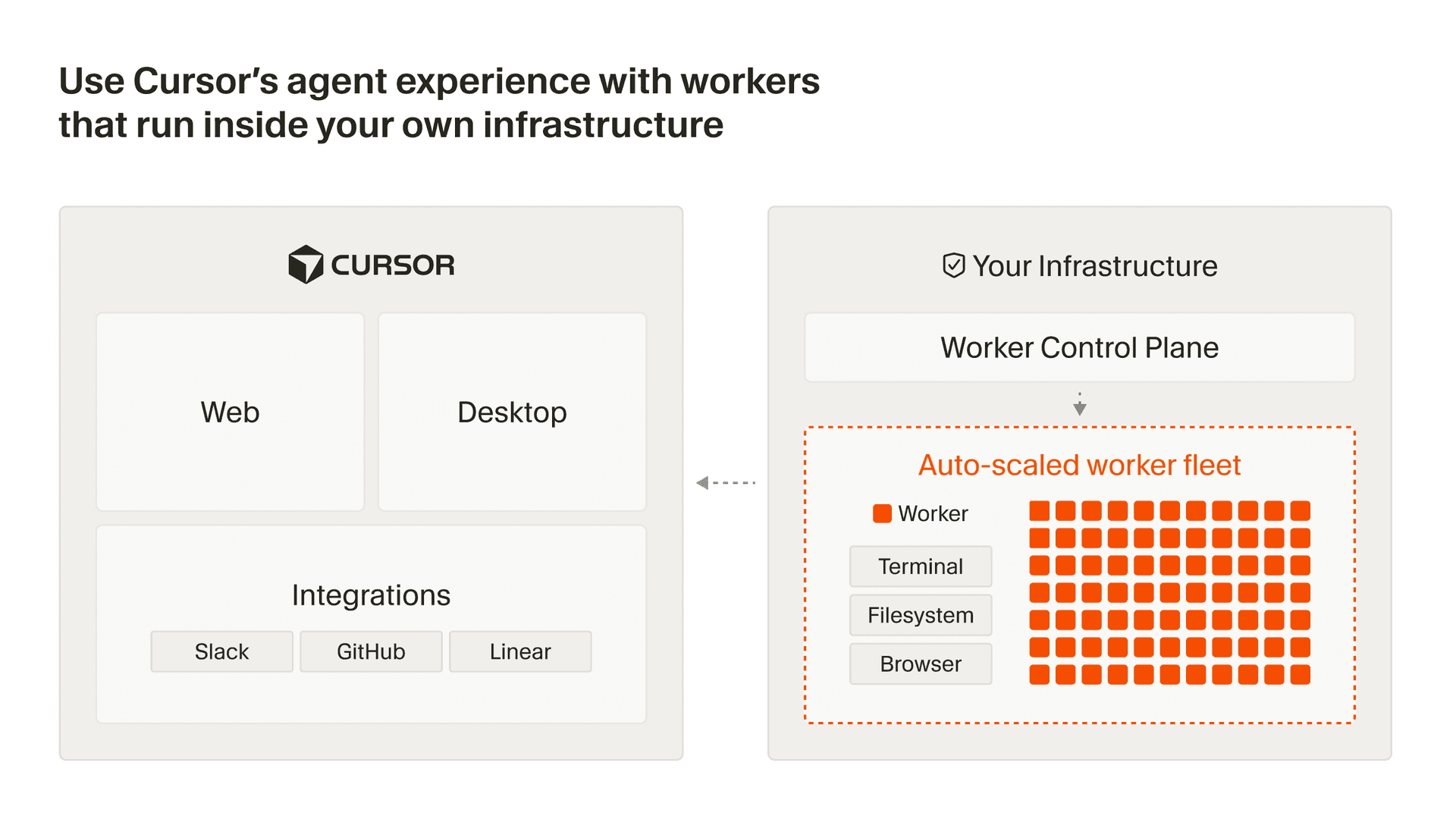
A worker is a process that connects outbound via HTTPS to Cursor's cloud—no inbound ports, firewall changes, or VPN tunnels required. When users kick off an agent session, Cursor's agent harness handles inference and planning, then sends tool calls to the worker for execution on your machine. Results flow back to Cursor for the next round of inference.
Each agent session gets its own dedicated worker, which is initiated with a single command: agent worker start. Workers can be long-lived or single-use, handling sessions indefinitely or tearing down as soon as a task is complete.
For organizations scaling to thousands of workers, we provide a Helm chart and Kubernetes operator. You can define a WorkerDeployment resource with your desired pool size, and the controller handles scaling, rolling updates, and lifecycle management automatically. For non-Kubernetes environments, a fleet management API allows you to monitor utilization and build autoscaling on any infrastructure.
Try it out today by enabling self-hosted cloud agents in your Cursor Dashboard, and learn more in our docs. For larger company-wide deployments, reach out to our team.


