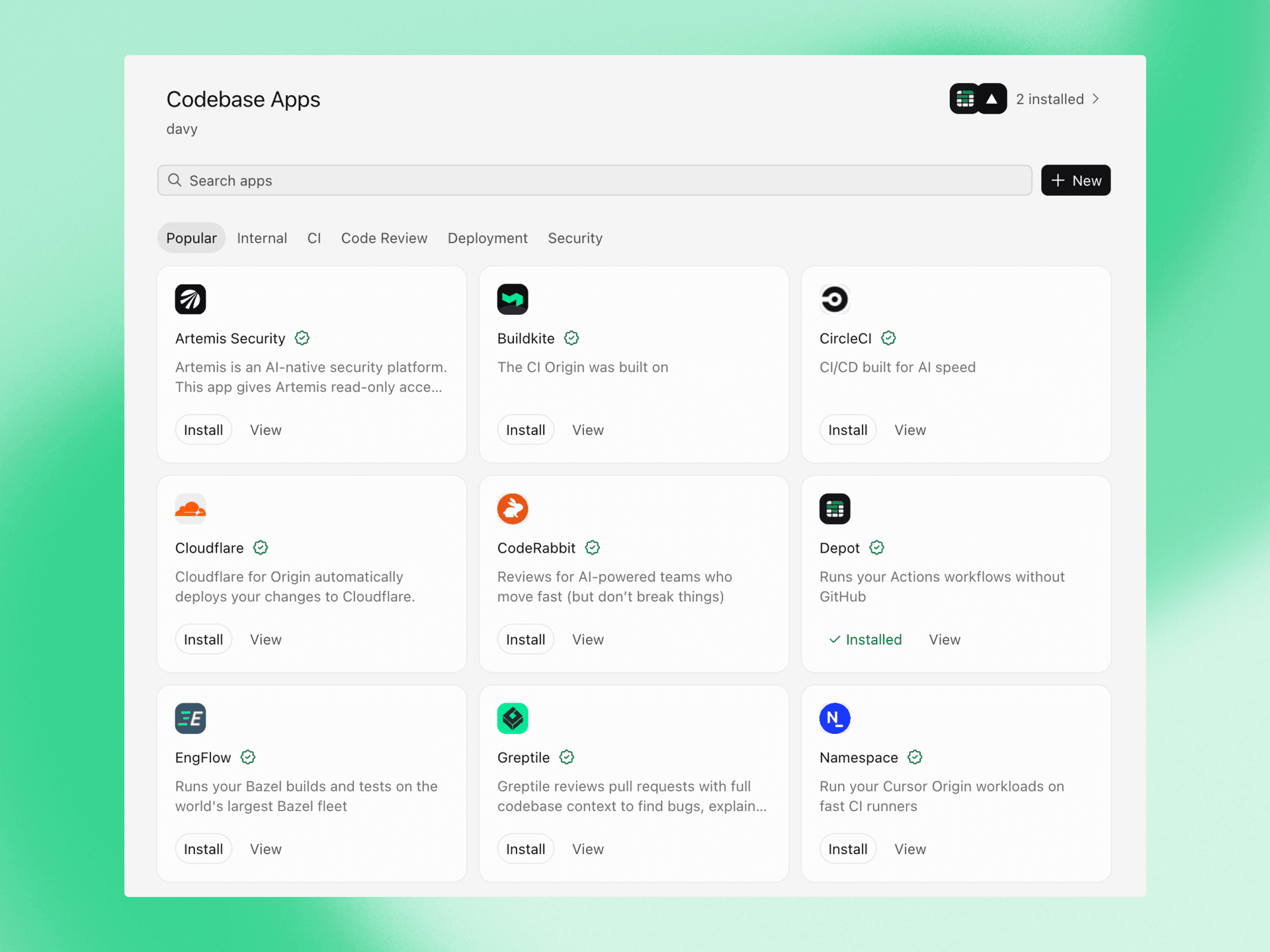
Origin now integrates with over 20 apps for deployments, CI, code review, security, monitoring, and project management, from partners including Cloudflare, Linear, Sentry, and Socket Security.
Starting today, the marketplace is also open to public submissions, so any team building developer tools can publish an app for Origin.
Create an app in your namespace. It stays private to your namespace while you build.
Build against the Origin API. Apps authenticate with an app JWT and installation access tokens, receive webhook events, and write back check runs, pull request comments, and reviews.
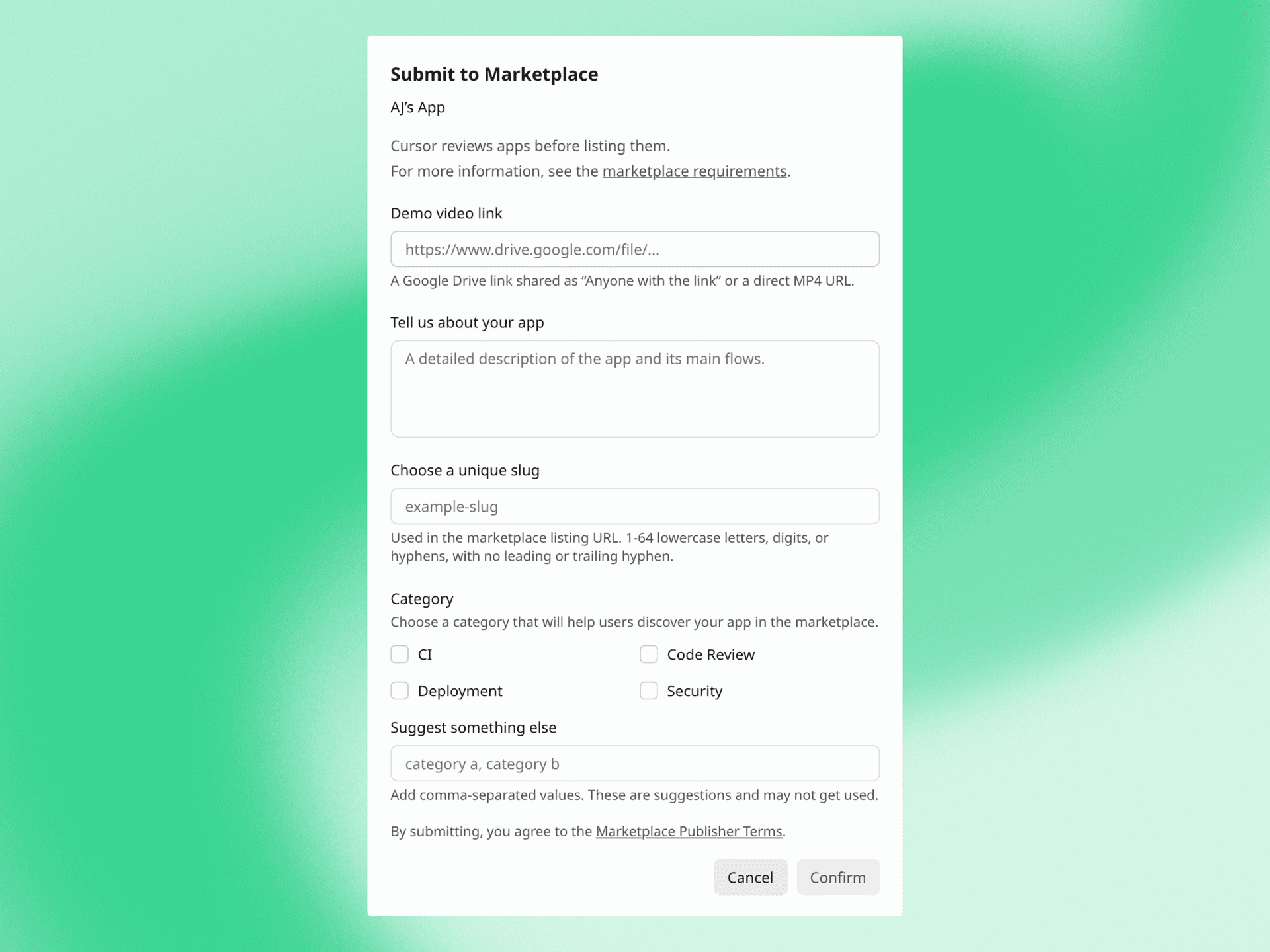
Make the app public, then submit it from the app's page with a slug, suggested tags, and a demo video. The video should show install, uninstall, and your core product flows.
We review the submission and list the app once it's approved.
Remote Control is on by default for everyone except Enterprise organizations.
Download the Cursor iOS app and sign in. Computers on your account appear in the app automatically. Tap your computer in the app and approve your pairing request in the Cursor desktop app. Your local agents appear in a list. Tap one to see what it's doing or send it a message.
Remote control doesn't move your agents anywhere. It keeps running on your computer, and the app connects to it. Your computer needs to stay on and online for remote control to work.
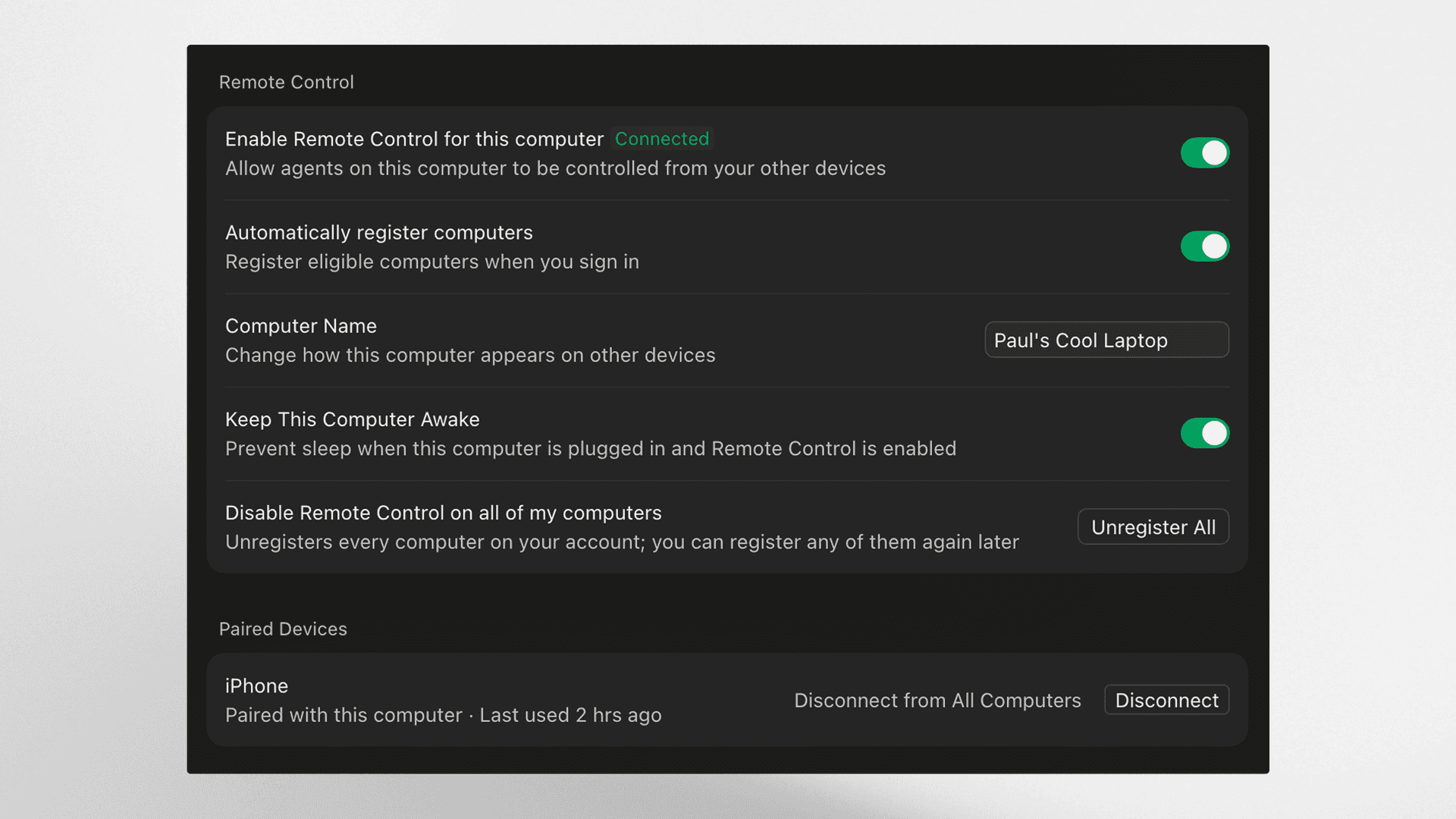
To stop your computer from sleeping while you're away, turn on "Keep this computer awake" under Remote Control in Cursor's desktop settings. Your computer needs to be plugged in with the lid open.
Remote control is on by default, except for Enterprise organizations. Enterprise admins can turn it on in Org settings > Security and identity > Remote control.
Remote control doesn't require cloud agents to work.
Remote control is available today in the Cursor iOS app.
Today we're launching two Cursor bots for the last mile of shipping code. Rollouts watches every change as it deploys and reports its health per environment. Security Review reports exploitable bugs on every pull request.
Both are available today on Teams and Enterprise plans.
Rollouts attaches a monitor to every pull request and watches the change as it deploys, reporting change health per environment: verified healthy, regression detected, or inconclusive. It's the Cursor version of Firetiger Change Monitors, rebuilt with the Bot Development Kit.
Enable it from the dashboard and connect source control, your deploy system, and your telemetry provider. Rollouts starts watching on the next pull request.
When a pull request opens, Rollouts reads the diff and the systems it touches, then writes a monitoring plan as a PR comment. The plan lists the risks it identified, the effect the change is meant to have, the signals it will check, and any gaps in instrumentation that would make the change hard to verify. Edit the plan in the PR and Rollouts uses your version.
Rollouts wakes on deploy events for the change's commit and runs the plan against your logs, metrics, and traces. It tracks each environment separately, so a change can be verified in staging and still flagged in production. Rollouts checks the change's intended effect alongside error and latency signals, and reports back on the PR when it reaches a verdict.
When Rollouts detects a regression, it names the change it suspects and notifies the author. Depending on configuration, it can also open a revert PR for review or hand the finding to a cloud agent for a fix. Rollouts does not merge or roll back on its own today.
Rollouts connects to Origin or GitHub for source control, to your continuous delivery system for deploy events, and to Datadog and other telemetry providers for signals. Feature flag integration is coming soon.
Security Review is available today. It reads every pull request in the context of the codebase and posts one review comment reporting exploitable bugs. Style and quality stay with Bugbot.
Enable it from the dashboard for the repositories you want reviewed. Draft PRs are skipped.
Security Review looks for injection across SQL, command, and template surfaces, along with authentication and authorization bypasses, including checks that a refactor stopped running. It also flags secrets and credentials committed to source, SSRF and unvalidated redirects, unsafe deserialization, and dependency changes that introduce known vulnerabilities. It traces where user input enters and what it passes through.
Add rules for your codebase, such as which client external calls must go through or which tables are never queried from a request handler, and Security Review enforces them on every PR.
Rollouts and Security Reviewer are available today on Teams and Enterprise plans. Enable either bot from the automations tab.
For the next 10 days, we're including usage credits so teams can try Rollouts on real changes. Teams and Enterprise customers receive credits for roughly 50 and 500 changes, respectively.
Today we're launching Projects in Cursor. Projects lets you take on larger bodies of work, such as a feature, a migration, or a full app. It maintains context over months of work, delegates tasks to thousands of subagents, and performs recurring work without being prompted.
Access Projects from the left-hand nav. The coordinator agent in a project doesn't write code itself; it plans the work, delegates it to agents that implement it, and brings the finished work back to you to check. Coordinators create and manage agents on your behalf, running as many in parallel as the work needs.
A Project runs on its own computer in the cloud, so closing your laptop doesn't stop it. When something needs testing on your machine, the coordinator spins up a local agent to run it there.
You shouldn't have to onboard an agent every time you start a task. Each Project maintains a set of files that sync across every cloud and local machine its agents use. Agents add research and artifacts, along with what they learn about the codebase and how you prefer work to be done. If one agent figures out how to test a service, for example, every future agent can use those instructions. The shared context grows with the Project, making the coordinator more effective over time.
Tell the coordinator agent to watch a Slack channel, run on a schedule, or follow all your PRs. This way it can take action based on signals it detects, without waiting for your prompt.
Connect Slack and point it at a bug-report channel, and it starts delegating each time a bug comes in.
Projects are available in beta and rolling out to all users starting today.
Origin now integrates with over 20 apps for deployments, CI, code review, security, monitoring, and project management, from partners including Cloudflare, Linear, Sentry, and Socket Security.
Starting today, the marketplace is also open to public submissions, so any team building developer tools can publish an app for Origin.
Create an app in your namespace. It stays private to your namespace while you build.
Build against the Origin API. Apps authenticate with an app JWT and installation access tokens, receive webhook events, and write back check runs, pull request comments, and reviews.
Make the app public, then submit it from the app's page with a slug, suggested tags, and a demo video. The video should show install, uninstall, and your core product flows.
We review the submission and list the app once it's approved.
Remote Control is on by default for everyone except Enterprise organizations.
Download the Cursor iOS app and sign in. Computers on your account appear in the app automatically. Tap your computer in the app and approve your pairing request in the Cursor desktop app. Your local agents appear in a list. Tap one to see what it's doing or send it a message.
Remote control doesn't move your agents anywhere. It keeps running on your computer, and the app connects to it. Your computer needs to stay on and online for remote control to work.
To stop your computer from sleeping while you're away, turn on "Keep this computer awake" under Remote Control in Cursor's desktop settings. Your computer needs to be plugged in with the lid open.
Remote control is on by default, except for Enterprise organizations. Enterprise admins can turn it on in Org settings > Security and identity > Remote control.
Remote control doesn't require cloud agents to work.
Remote control is available today in the Cursor iOS app.
Today we're launching two Cursor bots for the last mile of shipping code. Rollouts watches every change as it deploys and reports its health per environment. Security Review reports exploitable bugs on every pull request.
Both are available today on Teams and Enterprise plans.
Rollouts attaches a monitor to every pull request and watches the change as it deploys, reporting change health per environment: verified healthy, regression detected, or inconclusive. It's the Cursor version of Firetiger Change Monitors, rebuilt with the Bot Development Kit.
Enable it from the dashboard and connect source control, your deploy system, and your telemetry provider. Rollouts starts watching on the next pull request.
When a pull request opens, Rollouts reads the diff and the systems it touches, then writes a monitoring plan as a PR comment. The plan lists the risks it identified, the effect the change is meant to have, the signals it will check, and any gaps in instrumentation that would make the change hard to verify. Edit the plan in the PR and Rollouts uses your version.
Rollouts wakes on deploy events for the change's commit and runs the plan against your logs, metrics, and traces. It tracks each environment separately, so a change can be verified in staging and still flagged in production. Rollouts checks the change's intended effect alongside error and latency signals, and reports back on the PR when it reaches a verdict.
When Rollouts detects a regression, it names the change it suspects and notifies the author. Depending on configuration, it can also open a revert PR for review or hand the finding to a cloud agent for a fix. Rollouts does not merge or roll back on its own today.
Rollouts connects to Origin or GitHub for source control, to your continuous delivery system for deploy events, and to Datadog and other telemetry providers for signals. Feature flag integration is coming soon.
Security Review is available today. It reads every pull request in the context of the codebase and posts one review comment reporting exploitable bugs. Style and quality stay with Bugbot.
Enable it from the dashboard for the repositories you want reviewed. Draft PRs are skipped.
Security Review looks for injection across SQL, command, and template surfaces, along with authentication and authorization bypasses, including checks that a refactor stopped running. It also flags secrets and credentials committed to source, SSRF and unvalidated redirects, unsafe deserialization, and dependency changes that introduce known vulnerabilities. It traces where user input enters and what it passes through.
Add rules for your codebase, such as which client external calls must go through or which tables are never queried from a request handler, and Security Review enforces them on every PR.
Rollouts and Security Reviewer are available today on Teams and Enterprise plans. Enable either bot from the automations tab.
For the next 10 days, we're including usage credits so teams can try Rollouts on real changes. Teams and Enterprise customers receive credits for roughly 50 and 500 changes, respectively.
Today we're launching Projects in Cursor. Projects lets you take on larger bodies of work, such as a feature, a migration, or a full app. It maintains context over months of work, delegates tasks to thousands of subagents, and performs recurring work without being prompted.
Access Projects from the left-hand nav. The coordinator agent in a project doesn't write code itself; it plans the work, delegates it to agents that implement it, and brings the finished work back to you to check. Coordinators create and manage agents on your behalf, running as many in parallel as the work needs.
A Project runs on its own computer in the cloud, so closing your laptop doesn't stop it. When something needs testing on your machine, the coordinator spins up a local agent to run it there.
You shouldn't have to onboard an agent every time you start a task. Each Project maintains a set of files that sync across every cloud and local machine its agents use. Agents add research and artifacts, along with what they learn about the codebase and how you prefer work to be done. If one agent figures out how to test a service, for example, every future agent can use those instructions. The shared context grows with the Project, making the coordinator more effective over time.
Tell the coordinator agent to watch a Slack channel, run on a schedule, or follow all your PRs. This way it can take action based on signals it detects, without waiting for your prompt.
Connect Slack and point it at a bug-report channel, and it starts delegating each time a bug comes in.
Projects are available in beta and rolling out to all users starting today.